Tampilkan postingan dengan label zoom. Tampilkan semua postingan

Selasa, 01 Maret 2022

32+ Canva Zoom

32+ Canva Zoom

Canva Zoom Virtual Backgrounds The Canva Zoom Virtual Backgrounds let you place yourself anywhere you please. Canvas and Zoom Help In order to support you with your learning the WEA uses Canvas an online platform that provides you with information course materials and support as well as a location for you to submit your work.


Customizable Zoom Virtual Backgrounds You Can Download For Free Canva Art Background Background Background Templates

Zoom is a video-conferencing platform that teachers can use to host their classes online in real-time.

Canva zoom. Funny Zoom background ideas and templates 1. Our solution offers the best video audio and screen-sharing experience across Zoom Rooms Windows Mac iOS Android and H323SIP room systems. For large business seeking an integrated tool to keep their brand consistent.

Our solution offers the best video audio and screen-sharing experience across Zoom Rooms Windows Mac iOS Android and H323SIP room systems. You can learn more about how to download the Zoom here. Choose your favorite furry friend.

For individuals and small teams who want more advanced tools and more content. Add your personal touch with Canvas extensive range of free fonts and colors. You can also click on the percent boxnext to it.

We would like to show you a description here but the site wont allow us. For large organisations needing design and communication tools at scale. Canvas extensive yet easy to use design tools give you the complete freedom to customize your Zoom backgrounds.

Our division Zoom license has robust security controls and an expanded feature set which can be used to facilitate engaging and interactive learning experiences. CMD - Mac or CTRL - Windows At the bottom of the editor click and drag the sliderto the right or to the left to zoom in or out. How to use Canva backgrounds for Zoom CREATING AND USING VIRTUAL BACKGROUNDS IN ZOOM AND CANVAIn this Canva tutorial you will learn how to create virtual.

One of the best things about Zoom is its ability to make use of virtual backgrounds. It doesnt mean that the fun is any less because there are many unique ways to make the online get-together memorable. Zooming via HTML5 Canvas Context Showing how to use transform methods on the HTML5 Canvas Context to selectively zoom in and out.

A quick overview of using a Canva Zoom Background with Zoom Subscribe for more EdTech tips tutorials trainings and lessons. A powerful creative tool for your classroom and organization. Zoom unifies cloud video conferencing simple online meetings and cross platform group chat into one easy-to-use platform.

First open your favorite internet browser on your PC and click the link below to access the Canva homepage. Canva Pro is free for all registered nonprofits. Birthday Zoom virtual backgrounds by Canva Celebrating birthdays need to be in the presence of your loved ones but virtual parties have become more popular especially during times when were apart.

For individuals and small teams who want more advanced tools and more content. Now Canva the online design template website is allowing you to spice up your next video call with its customisable Zoom Virtual Backgrounds. You simply need a webcam or phone to join.

In this video Ill walk your though how to add a background image or video to your Zoom callsBut even better Ill show you how to take advantage of the new. Change colors add text or switch up fonts its all right there at your fingertips. Canva Pro is free for all registered nonprofits.

Mousewheel updown over the canvas to zoom in toout from that location. How to create a Zoom virtual background Choose a Zoom background template or design one from scratch. For individuals and small teams to create and download designs for any occasion.

Zoom unifies cloud video conferencing simple online meetings and cross platform group chat into one easy-to-use platform. Upload your own image or choose from our free image library. Plus dive into our huge media library filled with millions of photos videos and even animated stickers you can drag and drop into your design.

A powerful creative tool for your classroom and organization. Shift-click to zoom out. Higher valueswill zoom youin and lower valueswill zoom you out Fitwill select the best fit.

Zoom is a video-conferencing application that allows you to have virtual meetings via audio video or both. For individuals and small teams to create and download designs for any occasion. Zoom is the leader in modern enterprise video communications with an easy reliable cloud platform for video and audio conferencing chat and webinars across mobile desktop and room systems.

Click to zoom at that location. Create a Zoom background Easily integrate your background with Zoom. How to create a virtual background in Canva Upload into ZoomBlog.

Opens in a new tab or window Canva Pro is free for education and nonprofits. For large business seeking an integrated tool to keep their brand consistent. Here are some of the security features of Zoom.

Plus you can also up. How to make a Zoom background using Canva 1. Zoom Rooms is the original software-based conference room solution used around the world in board conference huddle and training rooms as well as executive offices and classrooms.

Then select the available Zoom background template with the Free logo on the Template tab on the left of the main screen or create your own design without selecting any template. Download and share it with the world. Simplify your teams work with integrations to tools you use every day advanced security and built-in approval workflows.

Senin, 07 Februari 2022

18+ Maps Zoom In

18+ Maps Zoom In


Map Location Zoom Slider Heat Map Design Maps Illustration Design Map Design

Senin, 10 Januari 2022

How To Look Good On Zoom Reddit

How To Look Good On Zoom Reddit

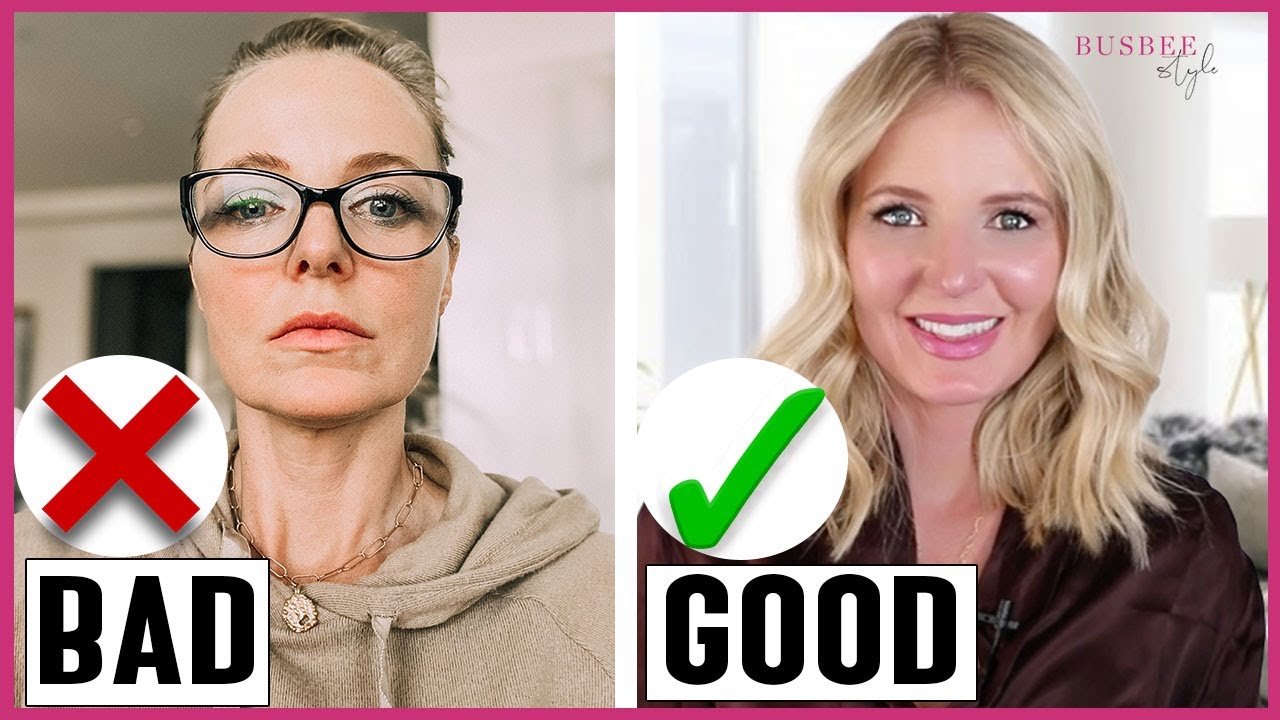
How to look good professional and confident on Zoom. Obviously this photo is assisted with photoshop and makeup just try to focus on the facial changes Look above the lens.


So I Have A Lot Of Zoom Backgrounds Here Are Just Some If You Have Classes Take A Video Of Yourself And Use It As Your Virtual Background R Zoom

Look into the camera while speaking.

How to look good on zoom reddit. Simply pointing a desk lamp with a 800-lumen bulb at your face will likely overwhelm your webcam and make you look like youre on the surface of the sun. Making sure your background isnt distracting. Press question mark to learn the rest of the keyboard shortcuts.

Even works for heavier people. Now that Zoom Skype and other services have taken over our daily lives as we know it including job interviews and dinner parties many are wondering how to look as good on the internet as. Press J to jump to the feed.

How to look good on zoom with your computer webcam. Doesnt have grid view so I had to use the web browser. Instead it now it takes you to the next video.

Here are his recommendations for an office that will make you lookand feelgood on Zoom. Nobody really feels good in a cardigan she said. A director at Facebook recently redid his remote work setup to include a DSLR camera standing desk.

Say about the top of your head. Click Touch up my appearance. In the Zoom desktop client click your profile picture then click Settings.

218k members in the Zoom community. Choose a professional background. Reddit gives you the best of the internet in one place.

Tuck in your shirt and roll up your sleeves to simultaneously look more polished more relaxed and more confident. How to Look Good On Zoom A Conversation with Dr. Popular-all-random-users AskReddit-funny-gaming-news-pics-movies-explainlikeimfive-worldnews.

One trick is to use daylight from your window as long as the sun is not directly shining on you. Its smooth like a babys bottom. Instantly Look Better On Zoom Calls With This Take Anywhere Ring Light.

You need a little bit of structure. Dressing appropriately in business casual clothing. GET COMFORTABLE WITH THE BASICS.

Use a laptop or computer. Theres a good deal. Put the computer up on a stack of books so the camera is slightly higher than your head.

Rick Goodman and Jess T. Zoom has become the default platform for video conferences but if you havent yet gotten comfortable using it or whatever platform your company favors take some time to check out any tutorials you can find online. Pick a quiet space.

You can also tilt your head slightly to the rightleft for added effect. Unofficial subreddit of the video conferencing platform Zoom. Click to share on Reddit Opens in new window.

Finding a spot with flattering light. Do you have any questions about how to look good on Zoom. Communicate with your household.

And then point it down into your eyes. In this video Ill go over the best angles for your computer and the best lighting so that you can look g. Zoom remembers your preference and uses it the next time you start or join a meeting on this computer.

Lets go over them in the comments section below. Use the slider to adjust the effect. Flicking the video to the side takes you back to the main view but for images flicking up takes you to the main view and flicking to the side takes you.

Find a good internet connection. Click SHOW MORE Shopping Links BelowSUBSCRIBE. Fair warning the Android app.

Previously flicking the video away up would take you back to the main view. On a Lenovo Duet and had so much grief with Zoom and just tried Google Meet. So for anyone still being dogged by Zoom maybe give Google Meet a.

Find a brightly lit room. Looking good on Zoom comes down to four simple factors. Stick your forehead out and down when smiling itll give you a definitive jawline and makes you look a whole lot better.

The key is finding a softer light source to gently bathe your image. This is part 1 of 2 showing how to look better on zoom or a webcam video callSUBSCRIBE TO The Newsletter - httpslpco. Click the Video tab.

Rolling up your sleeves meanwhile makes you look a little more relaxed conveying that while you make an effort to look good youre not too stuffy. I cant state this enough I never want to go to the next video. Zoom is trying to help you look better.

Heres how to look professional on Zoom video calls. Positioning your camera for the best angle.

Rabu, 08 Desember 2021

How To Look Better Zoom

How To Look Better Zoom

How to make yourself look better in a Zoom meeting by Lance Whitney in Software on August 24 2020 1050 AM PST The latest version of Zoom offers more ways to. If you do not have the Virtual Background tab and you have enabled it on the web portal sign out of the Zoom desktop client and sign in again.


Look Good On Video Calls For Zoom Facetime Skype Youtube Fade To Black Zoom Call How To Look Pretty

In fact there are a few things built into Zoom to help you naturally touch-up.

How to look better zoom. You may be wondering how can I make myself look better on Zoom. Go to the lower-left-hand corner of the screen find Video Settings and check the box marked Touch Up My Appearance Bless the creators of Zoom for offering this modern equivalent of vaseline on the lens. Click your profile picture then click Settings.

Sign in to the Zoom desktop client. In this video Ill go over the best angles for your computer and the best lighting so that you can look g. In this video Ill go over how to turn on Zooms touch up my appearance setting and how to use the new makeu.

Discover how to look good on Zoom and other video calls with 5 actionable easy-to-use strategies you can begin today to amplify your digital presence and ensure youre being heard - not just listened to - in virtual meetings. If youre looking to impress your boss via Zoom go for a sober button-down shirt or blouse. Opt for solid bright colors.

Solid white tops will wash you out on camera and while black is usually considered a slimming fashion choice dark tops can be over-powering on video calls. How to look good on Zoom using beauty filters. If you can have a light IN FRONT of you.

Whatever you do DONT have the light behind you. And avoid sitting in front of a big window as that can make you look dark. How to look good on zoom with your computer webcam.

Starting where we left off with the previous video how to look good on Zoom I am facing a big window. You can then click on your video to select the correct. Select Backgrounds Filters.

Please do this immediately if youre working from home and using the video conferencing service Zoom. Its the easiest way to look slightly more polished for a video call without actually. Heres the issue when I put my glasses on as you may have noticed we see all of this reflective stuff and the closer I get to the window the more we start to see all of that stuff going on which makes it so people cant see into our eyes.

It is a common problem for men all over the world and one that can be easily sorted out by using this product. Stick to solid colors and neutrals as much as possible as loud prints could be distracting. Did you know that theres a very easy way to touch-up your appearance in Zoom.

Connect with other participants. Use a virtual background. To look better on Zoom calls youll need a light source that brightens your face positioned in front of you.

Check I have a green screen if you have a physical green screen set up. If you want to know how to look better on Zoom here are 4 fashion tips to consider. What many people dont realize is that men have a lot of the same problems that women have when it comes to their appearance.

Depending on the climate where you live polos or sweaters may also be acceptable. Learn how to look good on Zoom by using these easy tips tricks WATCH THIS VIDEO NEXT 5 Easy FREE Ways to Look Better on Camera httpsyoutu.

Minggu, 31 Oktober 2021

How To Make Yourself Co Host On Zoom

How To Make Yourself Co Host On Zoom

The participants list will display. Its possible to set up a Zoom meeting with two hosts meaning more than one of you can manage the administrative side of your meeting.


How Can I Make A Student Guest A Host Co Host Zoom Bilkent

A user who is scheduling Zoom meetings can add one or more other users to be alternative hosts This allows either the scheduler owner of the meeting or any of the alternative hosts to start and run the meeting.

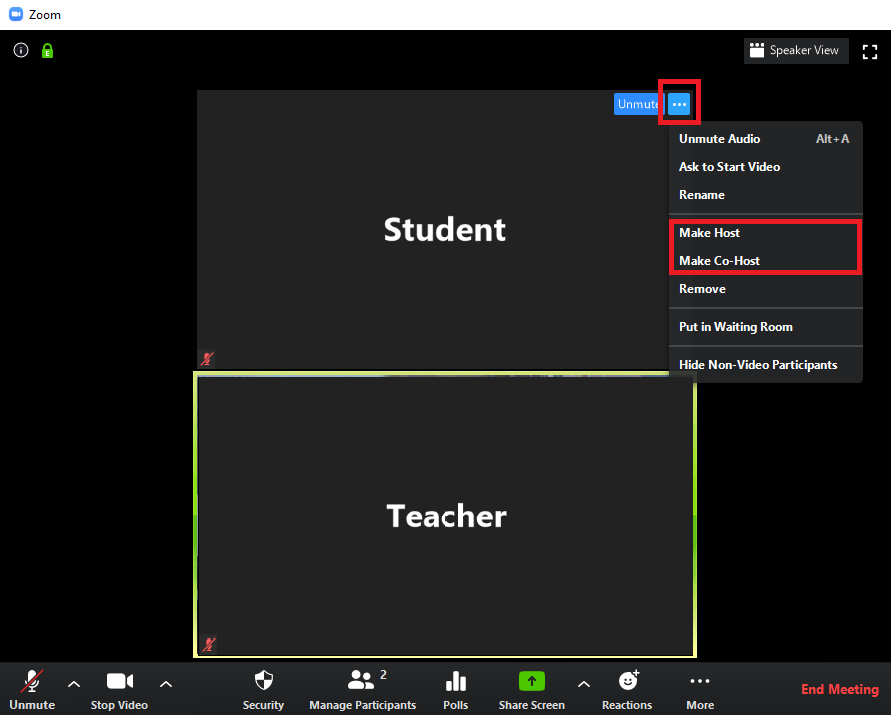
How to make yourself co host on zoom. Zoom 101 course httpsgumcosWuTS- SUBSCRIBE TO THIS CHANNEL. In the drop-down menu select the Make Co-Host option. Hover over the name of the participant youre passing host controls to and then select the More button.

While both the host and any co-hosts have the ability to assign participants to breakout rooms only the first submitted set of assignments will be accepted upon clicking Open All Rooms. Host controls allow you as the host to control various aspects of a Zoom meeting such as managing the participants. In the navigation menu click Account Management then Account Settings.

Start a meeting as a host on Zoom. Join a Zoom meeting. Its with an icon that looks like two people centered at the bottom of your.

Place the cursor on the video. Now select Make Host. If you dont have the option to add a co-host when you are the host of the meeting you must turn on this setting in the In Meeting Basic settings found at zoomusprofilesetting.

When you as a host assign another participant as a co-host they will be able to share some of the controls you have including managing the attendees and other administrative aspects during a meeting. In the video you can learn how to add Co-hosts and alternative hosts in Zoom meetings before and during the Zoom meetingsThe personuser who invites the oth. If you need help to join a meeting thats already in progress refer to How to Join a Zoom.

In a meeting the host places the cursor on the users video clicks and selects Make co-host. The co-host feature allows the host to share hosting privileges with another user allowing the co-host to manage the administrative side of the meeting such as managing participants or startingstopping the recording. In the menu that appears click the Make Host option.

To do so you need to have a paidlicensed Zoom plan. Users joined into the Zoom meeting from the Zoom Mobile App or H323SIP devices can participate in breakout rooms but cannot manage them. Sign in to the Zoom web portal as an administrator with permission to edit account settings.

That user is now the host of the Zoom call and the original host can leave the meeting. Zoom has a setting that you can adjust from your Zoom user profile via its web portal to chose whether or not co-hosting is available for meetings you host. In that case when the owner or another alternative host joins after the meeting has started they.

Youll find this app in the Start menu or Applications folder in Finder. How to use co-hosts in meetings. 1300 York Avenue Box 12 New York NY 10065 Phone.

Click Zoom in your left-hand subject menu in the LMS. Tap Claim Host at the bottom of the participants list. Tap Participants on the Zoom Rooms Controller.

This will make the selected participant as co-host. In the Meeting tab navigate to the Request permission to unmute option under the In Meeting Advanced section and verify that the setting is enabled. Can You Have Two Hosts on Zoom.

HttpbitlymrhackioJoin Amazon Prime Video 30 day free trial. Go to scheduled meeting or go to your Personal Meeting Room. There is a unique Join URL.

How to claim host. Whoever starts the meeting the owner or alternative host will be the host. Click Start this Meeting.

There are two ways to co-host users. Answer 1 of 15. Save or write this down as you will need it for your second device.

Host co-host another participant in the participant window. Confirm the selection by clicking Yes. On the meeting screen click on the 3-dot icon which appears over the participants video feed when hovering over it.

Link of the apphttpwwwapphaxcozoomindexhtmlHack zoom appDownload zoom modDownload zoomDownload zoom plusDownload zoom appZoomHack zoomHacknepal. Using a Zoom Room start or join a meeting. A message will appear asking if youre sure youd like to change the host to.

A window will display allowing you to claim. Zoom offers the ability to add a co-host during a meeting session. Open the list of the participants hover over the participant who is going to be the next host and then select More.

Dont click on it or you may enter as a student rather than host.