Tampilkan postingan dengan label office. Tampilkan semua postingan

Selasa, 12 April 2022

15+ Office 365 Home

15+ Office 365 Home

By using this site you agree to the use of cookies for analytics personalised content and ads. Includes the exact same features as the personal subscription but it can be used in up to five computing devices at once.


Microsoft Office 365 Home 1 Year Subscription Download Microsoft Office Home Microsoft Office Microsoft

New name more benefits.

Office 365 home. 4 Organize your time. The entire suite of Microsoft Office applications can be purchased at an accessible price in the form of MS Office 365 a comprehensive suite that will take care of all your office software needs. Product Description Office 365 Home- 1Yr Subscription- Electronic Download Office 365 is the smart way to buy Office An annual subscription to Office 365 provides you with the new Office 2016 applications plus a whole lot more.

Office 365 Home provides licenses for six people and its just 100 for a yearly plan. Microsoft 365 Family is the best way to join Office. Ad Free UK Delivery on Eligible Orders.

You can keep working even if you are not online4. We may earn a commission for purchases using our links. Office 365 Home - Free Download Office 365 Home Subscription-based version of the stalwart writing and publishing suite Download You will be redirected to the author website to complete.

You can also opt for a deal that costs 10 monthly. Microsoft Office 365 Deals in the United Kingdom Filter by Clear all Price range Pricing Store Condition Other Free shipping available. Home page Best deals Discounts Microsoft office 365 Microsoft Office 365 Deals in the United Kingdom Sort.

Microsoft 365 Family 9999 87 at Walmart US. Install the applications on your PC or Mac tablet and phone so you can work how where and when you like. All-new Office 2016 applications.

Microsoft 365 for home use. Ad Compare All Microsoft 365 Products Choose The Best Plan Thats Right For You Buy Now. Whether you have a PC or an Apple computer Office software staples like Word Excel Publisher and Outlook are well established as the standard go-to office software solutions.

Available only to learning institutions. Office 365 comes fully loaded with the latest and greatest versions of Word Excel PowerPoint OneNote Outlook and more downloaded directly to your favourite devices. Or maybe youre a home user but your needs have changed.

Intelligent and secure email and calendar app from Outlook. See plans and pricing Work across your devices Use Premium Microsoft 365 apps on up to five devices at the same time including Windows macOS iOS and Android devices. With a subscription to Microsoft 365 Family or Microsoft 365 Personal you get premium productivity apps extra cloud storage advanced security and more all in one convenient subscription.

Ad Compare All Microsoft 365 Products Choose The Best Plan Thats Right For You Buy Now. For as little as 004 per day up to six people can enjoy premium. Includes the full Office Online suite Word Excel PowerPoint OneNote along with unlimited cloud storage and it can be used in up to five computers simultaneously.

Latest premium apps like Word Excel and PowerPoint. Microsoft 365 for home use Get premium Office apps extra cloud storage advanced security and more all in one convenient subscription. Plans Pricing More Microsoft 365 You and your family can get more done with Microsoft 365 See plans and pricing One subscription across all your devices Create edit save share schedule connect and more on up to five devices at the same time including Windows macOS iOS and Android devices.

Get set for office 365 home at Argos. Office 365 Home --- For up to six people best for families Priced at 9999 a year or 999 a month Office 365 Home is a subscription that wed recommend for families. Same Day delivery 7 days a week 395 or fast store collection.

Office 365 Home helps you get things done from virtually anywhere on all your devices.

Kamis, 31 Maret 2022

25+ Office 365 App

25+ Office 365 App

Create impressive documents and improve your writing with built-in intelligent features. With intelligent cloud services and trusted security the Office app will help maximise your productivity in both work and life.


Microsoft Azure Design Elements Azure Architecture Microsoft Products Azure Storage Vector Icons Microsoft In 2021 Microsoft Microsoft Software Software Apps

Set up Microsoft 365 operated by 21Vianet on your iOS device.

Office 365 app. Select Yes to allow the app to make changes to your device. From the admin center select Office software. Accessing any Office 365 App.

Microsoft 365 Family currently goes for 9999year or 999 per month while Microsoft 365 Personal sets buyers back by 6999year or 699 per month. If you have Windows 81 or 80 type the name of an Office app on the Start screen. Without a subscription youll be prompted to purchase a subscription whenever youre trying to access a premium feature.

Microsoft has lately worked a lot on making its Office software look less ancient and gave users the first glimpse of a major design overhaul last year that is now in full effect. In addition to powerful desktop apps you can also download each app for your Android. What Office apps do I get with Microsoft 365.

This is currently under investigation and the RSS feed will be updated after resolution. Microsoft 365 is a suite of apps that help you stay connected and get things done. To open the Office app select its icon in the search results.

Ad Compare Plans Pricing For The Latest Version of Microsoft 365 Download Today. A free 1-month trial of Microsoft 365 is included with each Microsoft 365 in-app purchase. The Office app also supports premium features that are available with a qualifying Office 365 subscription.

How do I use the app. The App launcher makes opening and switching between your apps easy by highlighting your recently used apps and providing quick access to your recent online Office documents. This gives you an idea of what it looks like.

Once installation is complete youll see a quick tour of how. Editor Microsoft Editor Endpoint Manager Microsoft Endpoint Manager Enterprise Mobility Security. For more information see What you can do in.

Office 365 Portal and shared. Option One - In Windows 10 or Windows 11 press Ctrl Windows logo key Q. Simplify complex data and create easy-to-read spreadsheets.

The RSS feed generation is duplicating GUIDs some RSS readers arent reporting new entries as a result. After youve signed up for Microsoft 365 you and your employees can install your Office apps. When prompted select Run.

Get Office apps such as Word Excel PowerPoint Outlook OneNote OneDrive and more. Write like a pro with editing and writing suggestions in Word. The Office app is ready for the iPad Pro.

Dumfries and Galloway College provide all students with an Office 365 account. To open Quick Assist please follow these instructions. Business apps 365 apps office store apps dynamics apps outlook apps word apps government apps education apps.

To open an Office app select the Start button lower-left corner of your screen and type the name of an Office app like Word. Additional IP addresses for Cloud App Security. Take control with Microsoft 365 and create more time for the things that matter most.

Ad Compare Plans Pricing For The Latest Version of Microsoft 365 Download Today. From Word documents PowerPoint presentations or Excel files the Office app provides you with one seamless experience. If youre using Windows 10 or Windows 11 Quick Assist is the remote support application that enables you to receive or provide assistance over a remote connection.

The new Office Mobile app combines Word Excel and PowerPoint with exclusive features to make it your go-to productivity app for phone tabletor both. Word Excel and PowerPoint in one app View edit and share files without the need to switch between multiple apps. Choose a language and then select Install.

Download Microsoft Office for Windows 10 Mobile. Also see What can you do in the Office apps with Microsoft 365 for more details. Defender for Identity Microsoft Defender for Identity Defender for Office 365 Microsoft Defender for Office 365 E.

View create and edit documents spreadsheets presentations and more with Office apps designed for Windows. Word Excel PowerPoint combined. Open Quick Assist on your device.

Cant find your Office apps. This guide will show you how to connect to Office 365 and what features are available to you as a student. All users also receive at least 1 TB of OneDrive cloud storage making it easy to share collaborate and edit documents from anywhere.

Learn more about Microsoft 365 plans. The installation may take several minutes depending on your Internet speed. Microsoft 365 is a single download bundle that gives you access to essential apps like Word Excel PowerPoint and Outlook.

Set up Office mobile apps on the iPhone iPad or iPod Touch. Complete your workflows no matter where you are. Its possible to run your life like a pro keep your stuff secure find balance and achieve peace of mind.

You can now download a single Office mobile app which combines Word Excel and PowerPoint from the App store. You can use this account to access apps like Word Teams Excel as well as LearnNet where you will find your course materials.

Jumat, 18 Maret 2022

26+ Office 365 Key Cheap

26+ Office 365 Key Cheap

Use the CD Key Code to download directly on the Official Website or from the store to play Microsoft Office 365 Home Premium. Microsoft Office 365 Home 1 Jahr german for Windows and MAC Product Key Card without Datenträger 47 out of 5 stars.


Microsoft Office 365 Businesspremium 12 Month Subscription 1 Person Pc Mac Download Klq 00218 Microsoft Office Office 365 Microsoft

You need to open command prompt with admin rights then follow the instruction below step by step.

Office 365 key cheap. Our prices are the lowest in the world. As of this writing we found Office 2016 Home Student for 79 on Amazon. PC GLOBAL Unknown 698.

2330 trying to install win10 09 Nov 2020 9. Delivery Bacs Invoice Downloadable Private Couriers Write shop review 4096 4096 incl. PUBLISHER WEBSITE CD KEY.

In this situation the user also has the option to use a cheap Office 365 key for free with a crack version that can be used forever. Ad Free UK Delivery on Eligible Orders. And Office 2013 for 200-240 on Amazon.

Office 365 apps up to 6 users 1 year subscription Multiple PCsMacs Tablets and Phones multilingual Box. Just copypaste the commands and do not forget to hit Enter in order to execute them. In this video youll find out- how most of the deals on cheap Office product keys make money for scammers- what will happen to your computer if you buy thos.

Inbox Message between 1 Hour to 6 hours max after you make purchase. 1-16 of 86 results for microsoft office cheap Price and other details may vary based on product size and colour. Follow the instructions given by the store.

However for better security and advancement it is recommended to use a licensed version which may be expensive but. Buy Office 2019 Key From a Third Party Microsoft Office Online Microsoft 365 Personal Microsoft 365 Family Microsoft 365 Education Third-Party Microsoft 365 Keys. You could also try eBay.

Delivery Downloadable Write shop review Microsoft Office 365 Personal PKC Box 3869 4298 incl. My Computers SIW2 Posts. There is 1 offer at 5495.

Business Basic gives you. Ad Free UK Delivery on Eligible Orders. Microsoft Office Home And Business 2019 - Phone Activation.

Follow the instructions given by the store. 44 out of 5 stars 40. All our keys are delivered instantly via Autokey - our automatic key delivery system.

Microsoft Office Professional Plus 2013 Cd Key digital Download PC GLOBAL Unknown 1166. Im now aware of a cheap office 365 key as its a subscription service rather than a key and you pay MS directly There are some options like an educational license which can get you reduced prices. You run commands one by one manually to activate Microsoft Office 365 without product key.

We offer a wide range of editions including Professional Plus Home and Business and even Office 365. 5 PC 1 Year. Other than that I think the only options are the personal and the family plans.

Office 365 Personal Download only 3799 3799 incl. Box with Key Card New Original No Disk MS Office 2016 Home Student. Microsoft Office Professional Plus 2010 Cd Key digital Download PC GLOBAL Unknown 1097.

Office 365 gives you access to the latest available Microsoft. 8 hours ago Method 1. Use the CD Key Code to download directly on the Official Website or from the store to play Microsoft Office 365 Home Premium.

Microsoft 365 Business Basic 60 5484 at Connection US Save 9 off the price of Microsofts most affordable Office suite ever. Delivery Will usually delivered within 1 working day of receiving cleared payment. Microsoft Office 365 Home McAfee Total Protection only 3999 at Argos A rare and outrageously good deal that provides you with Microsofts complete suite of Office applications free Skype.

Best Place to Buy Cheap Microsoft Office Key 201636520072019Home and Student2019 Visio Professional2019 Project Professional and so on for PCMAC. Verify languages available and possible region restrictions before buying. This is a account email and pass not a key.

PUBLISHER WEBSITE CD KEY. I also sell Microsoft Office 365 account 60account to activate Office 365. If youre looking for an affordable way to activate your license permanently then look no further than CJS CD Keys.

Follow the instructions given by the store.

Rabu, 09 Maret 2022

Jumat, 25 Februari 2022

18+ Office 365 Zotero

18+ Office 365 Zotero

Then select Office apps. If a PDF is available the Connector can save it to your library to read later and it can even save snapshots of webpages in case they change or disappear.


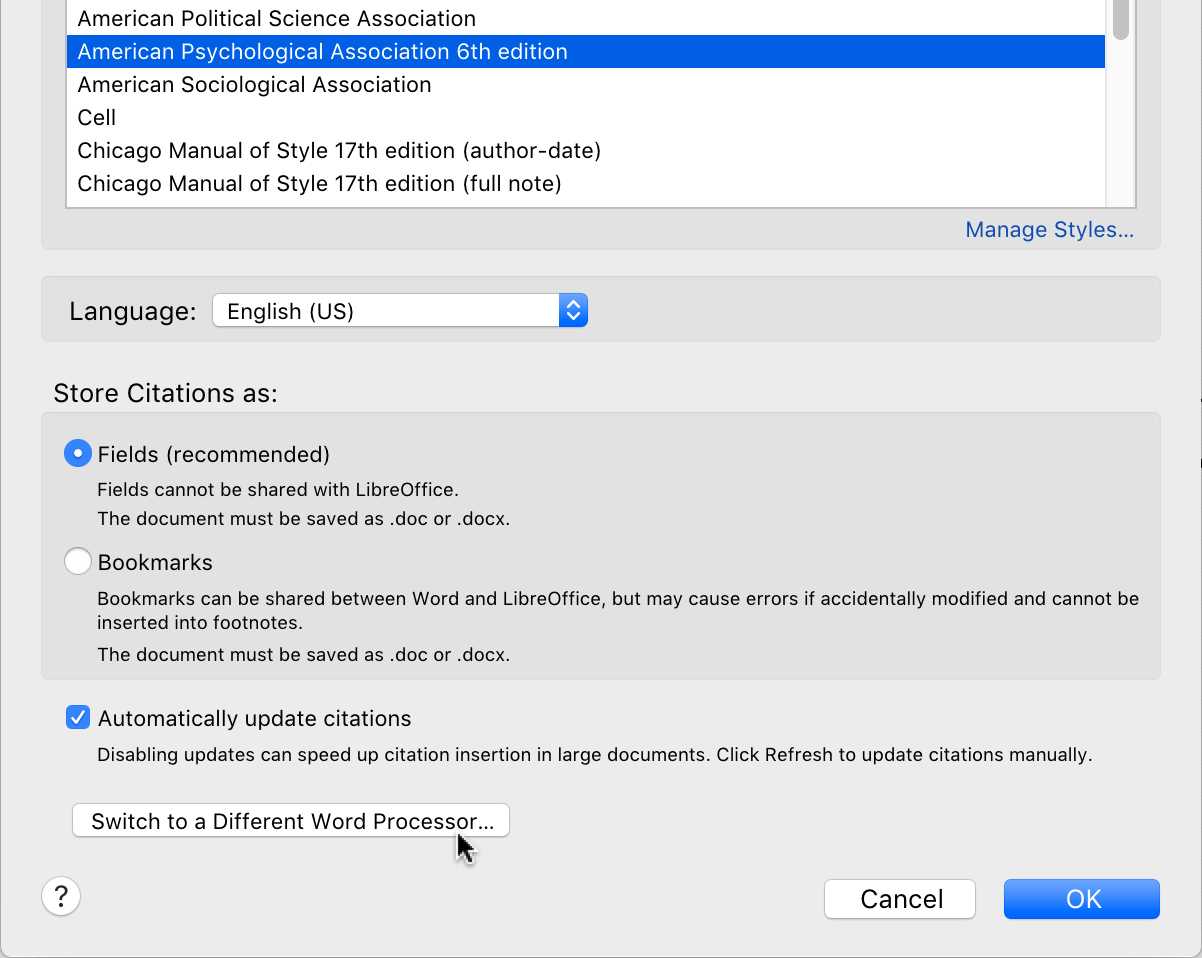
Kb Moving Documents Between Word Processors Zotero Documentation

To edit your in.

Office 365 zotero. Word Open the downloaded Zotero file exe or dmg. Follow the installation directions. Download Zotero 50 and browser Connector.

The Word plugin for Zotero doesnt work with Office 365 Online it only works with the local versionapp downloaded on your computer. Ad Access Microsoft 365 Anywhere. If youre having trouble see Manually Installing the Zotero Word Processor Plugin or Word Processor Plugin Troubleshooting.

The Zotero Connector automatically senses content as you browse the web and allows you to save items to Zotero with a single click. Open a new File Explorer window and paste the Startup folder path into the address bar. In the Zotero dialog box search for your source.

Once its downloaded open the installer and wait for the installation to complete at which point you can click on Close. Zotero and an MS Word add-in will be installed. The Zotero dialog box will open.

Or create saved searches that automatically fill with relevant materials as you work. Java Runtime Environment JRE or Java Development Kit JDK. If Word is up to date install the latest version of Zotero.

Word 20082021 or Office 365. I have tried everything on the Zotero support site but nothing has helped. To install Microsoft 365 Office apps on your Windows machine.

If you are using the online Office 365 version you will need these special instructions to use Zotero and Word together. The Zotero Connector automatically senses content as you browse the web and allows you to save items to Zotero with a single click. Word and Zotero work fine together as long as youre up to date with both products.

In Word from the Zotero menu click Insert Citation may be an icon. Zotero helps you organize your research any way you want. Go to and download Zotero 50 for Windows 2.

Currently running Office 365 is the same as running 2019 and you get the same updates from Microsoft too so Zotero support for Office 365 is no different to that of 2019 until Office 2022 comes along at which point Office 365 support would be the same as 2022. Make sure your Mac has a working internet connection. Then copy the file called Zoterodotm If you do not see Zoterodotm in this directory try the following directory.

Zotero is a project of the Corporation for Digital Scholarship a nonprofit organization dedicated to the development of software and services for researchers and cultural heritage institutions and is developed by a global community. Installing Zotero on Word through Office 365 1. If a PDF is available the Connector can save it to your library to read later and it can.

However I have recently changed to a new computer and Zotero is no longer even popping up in the tool tabs of Word. Shop Microsoft Official Site Now. Fast and Easy Setup.

Go to the Help menu and choose Check for Updates. Let AutoUpdate check for and install updates. Paste the Zoterodotm file into the Office 365 STARTUP folder.

Add In-Text Citations and Footnotes. In this guide I will demonstrate how to use the reference manager Zotero to swiftly add and remove citations into a Microsoft Word documentTHE ONLINE GUIDE. To find Words STARTUP folder from the ribbon menu select File - Options - Advanced - General group - File Locations.

Zotero is a free easy-to-use open-source tool to help you collect organize cite and share research. Open any Office application. How to use zotero plug with word 365.

To add an in-text citation or footnote. Word 2010-2021 or Office 365 excluding Word 2010 Starter Edition. Sign in to your email.

Copy the Zoterodotm file from install to your Word. Zotero in Word may look different depending on operating systems and software versions. Click on Install if you are prompted with a User Account Control popup click on Yes.

Ad Access Microsoft 365 Anywhere. Restart Word and you should now see Zotero in the ribbon menu. Zotero is a free easy-to-use open-source tool to help you collect organize cite and share research.

Open the Zotero program. Look for Zotero Add-ins or a. If you previously installed the Firefox versions of the word processor plugins into Zotero 50 or Zotero Standalone 40 you should uninstall them from Tools Add-ons.

The install folder containing Zoterodotm and the Word startup folder. LibreOffice 52 or later. Zotero is a free easy-to-use open-source tool to help you collect organize cite and share research.

Open the desktop version of Word 365 3. You should now have two folders open. The Zotero Connector automatically senses content as you browse the web and allows you to save items to Zotero with a single click.

Zotero - Office Ad-Ins Hello I am currently writing many essays with the help of Zotero to do my citations. If a PDF is available the Connector can save it to your library to read later and it can even save snapshots of webpages in case they change or disappear. November 13 2018 edited November 13 2018.

Shop Microsoft Official Site Now. Fast and Easy Setup. You can sort items into collections and tag them with keywords.

The above instructions allow Zotero to work with Microsoft Word that is installed on your computer. Close any Microsoft Office programs eg. Click on your initials on the top-right of the screen then select My Account.

Free online version of MS Word. Help me to add more content for students donate a little. Zotero is a project of the Corporation for Digital Scholarship.

Zotero DOES NOT work with Chromebooks or Office 365. You should see a file type called Startup with a location next to it.

Selasa, 22 Februari 2022

30+ Office 365 Brunel

30+ Office 365 Brunel

Diversity Identity in the Canadian Security Intelligence Service. Things to be aware of when changing your network password.


2

Brunel International NV a global workforce solutions provider has chosen Veeam Availability Suite and Veeam Backup for Microsoft Office 365 to support the companys recruitment and staffing solutions.

Office 365 brunel. Brunel is an international company with a strong global brand. The latest version of Write N Cite for Legacy RefWorks is version 44. Log in to OneDrive with your Microsoft or Office 365 account.

Please try again later. Student socialnetworking event for students of module EC3066. Information about Outlook email and calendar as well as other Office 365 services is available on the Office 365 Support Site UoB only.

Linking with various IT teams to uncover complex dependencies. There have been some exciting. Choose a secure password.

The system requirements in the table below apply to Microsoft 365 Apps for enterprise as well as all business education and government plans 1. Provides complete control and protection of data in Office 365. IT Wi-fi emails printing Office 365 Academic Skills ASK.

This includes information about setting up University email on your mobile device. This should be available to download from RefWorks and is compatible with all versions of MS Office from 2007 to 2013. Office 365 includes OneDrive for Business a secure cloud storage service Yammer.

Microsoft Office 365 provides a suite of tools including Office applications. Ad Compare Plans Pricing For The Latest Version of Microsoft 365 Download Today. Brunel University London now offers all members a version of Microsoft Office 365 free under an educational licence for the duration of your studies staff members may also take advantage of this offer.

Access to Microsoft Office 365. Brunel systems and printing Access your Office 365 Email opens new window. By Gillian Trevethan Jul 20 2020.

By clicking on or navigating this site you accept our use of cookies in accordance with our cookie policy. You may obtain the package by logging on to the Brunel Connect Portal httpsconnectbrunelacuk and then under My Apps sign in to Microsoft Office 365. How to change your password.

Microsoft 365 plans for business education and government. Access your Office 365 Email opens new window. Veeam helps Brunel protect data that supports professional staffing.

Posted on Mon 17 Aug 2015 at 1346 by Joe Nicell. They also apply to standalone plans for individual services such as email-only or online-meetings-only plans. Veeam helps Brunel protect critical data powering the solutions and provides complete control and protection of Office 365 data.

How can I reset my password. My first responsibility was taking over management of the SCCM server and implementation of an SCCM network management tool called Adaptiva. Accounts logins and service status.

Project managed the Office 365 Cloud Email and Collaboration Tools Project. Oct 2015 - Mar 20171 year 6 months. All student Brunel accounts were migrated from Google Mail Gmail to Office 365 email in 2018 which is the first step in our move towards cloud collaboration tools.

Open all Close all. Free Microsoft Office 365 for all students. From today any student studying at Brunel will be able to download Microsoft 365 ProPlus onto any 5 devices of their choice for free.

My account is locked. After working with the University Aaron Lowman VP CHLS has secured free Microsoft office for all students and staff. Weve launched Microsoft Teams for students.

How do I access Brunel email. Brunel University London Kingston Lane Uxbridge Middlesex UB8 3PH. Open all Close all.

ASPIRE Graduate Careers Events - Barratt Developments. I created and managed an Office 365 deployment in SCCM which was deployed across the estate in waves ahead of the mailboxes being migrated. This works with both Legacy and new RefWorks.

Next up is the launch of new tools such as Skype for Business OneDrive OneNote Groups Sway Forms Planner and Yammer. Brunelacuk uses cookies to make our site better for you. For Office 2016 on both Windows and Mac you would need to install the RefWorks Citation Manager.

Weve launched Microsoft Teams for students. What is my email address. Many companies assume Office 365 is already protected in the cloud so theres no need to have a copy of the data Nonnekes said.

If you find that. I recruited and lead a team of 5 people. Office 365 Project Manager.

My first project at ENGIE was an Office 365 deployment and migration from on-premise Exchange to Office 365. Ad Compare Plans Pricing For The Latest Version of Microsoft 365 Download Today. Improvements in the student portal.